


Monday morning, 8:30.
Service wants an AI assistant.
Sales wants a customer portal.
Operations wants to automate a manual workflow.
Engineering says the data is a mess.
IT asks who will operate the thing.
Finance wants to know when this will pay back.
And someone in the room asks the only question that really matters:
“What should we actually invest in first?”
That is exactly the moment where a canvas can help as a lightweight first decision gate.
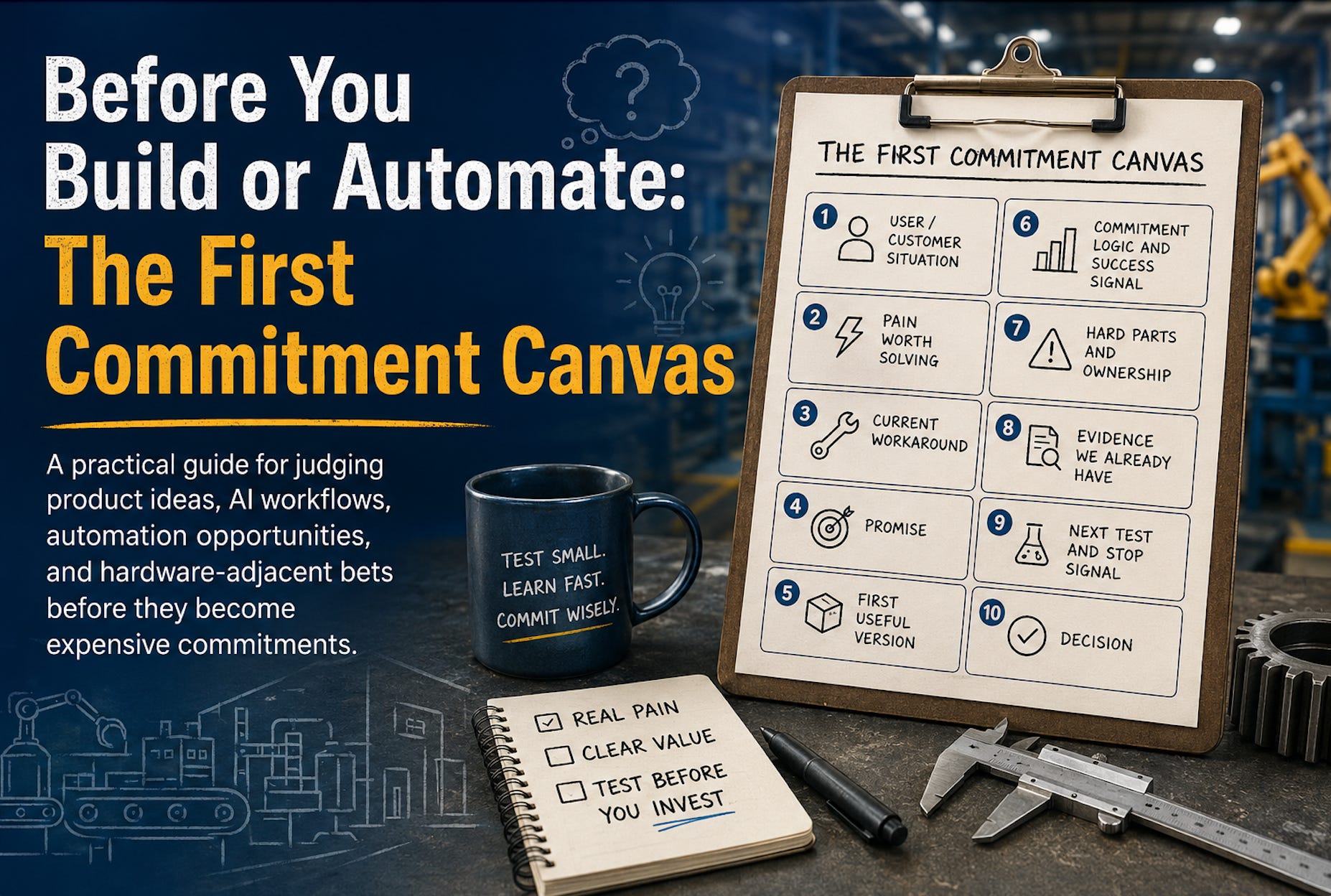
Let’s call it the First Commitment Canvas.
Its job is simple: protect the company from investing too much time, money and attention before the idea has earned it.
Commitment means more than budget. It means engineering time, management attention, roadmap space, operational ownership and expectations that are hard to take back.
The canvas helps decide whether an idea should be stopped, tested, explored further or given its first serious commitment.
On the shopfloor, nobody moves a machine because it looked good in a meeting. You walk the line first. You watch the work. You talk to the people who deal with the problems every day. You check what might break when the flow changes.
Product and automation decisions deserve the same discipline (especially when the next step could consume six months of engineering time and a budget nobody gets back).
A canvas will not save a bad idea. But it can stop a bad idea from becoming an expensive project.
Used well, it helps a team answer a practical question:
“What would have to be true for this to be worth building?”
And for automation or AI workflows:
“What would have to be true for this to be worth running every day?”
That second question matters.
Products usually hurt when you build them. AI workflows may also hurt every time they run: model calls, tool calls, retrieval of documents or data, monitoring, infrastructure and human review.
The goal is simple: after one focused meeting, the team should know the next move.
Stop.
Learn more.
Run a test.
Or commit to a first useful version.
TL;DR
The First Commitment Canvas is a practical one-page tool for judging whether an idea deserves its first serious commitment.
Use it before a product idea, AI workflow, automation project or hardware-adjacent opportunity becomes a real project, backlog item, budget request or daily operating cost.
It helps answer:
Is the pain real?
Is there evidence?
Is the payoff believable?
What could make this fail?
Who owns it after launch?
What will it cost to build and run?
What should we test before committing more?
It is not a scoring tool. It is a structured conversation that helps a team decide what deserves the next step.
You can use the canvas without reading the theory first. Jump to the ten fields, pick one idea and discuss it for 60 minutes.
The point is not to create a perfect document.
The point is to avoid turning a promising idea into an expensive commitment before it has earned one.
What This Helps You Decide
The First Commitment Canvas is built for one early decision:
Has this idea earned its first serious commitment?
Earning commitment does not always mean earning a build team.
Sometimes the right decision is to stop. Sometimes it is to learn more. Sometimes it is to run a small test. Sometimes it is to commit to a first useful version.
It keeps a promising idea from quietly turning into a project before anyone has checked whether it deserves one.
It is not meant to produce a perfect strategy document. It is meant to make the first decision gate clearer.
That is useful when ideas sound promising, but the real implications are still unclear.
A spare parts portal sounds simple, until you look at machine configurations, ERP data, dealer agreements, pricing rules and outdated part numbers.
An AI assistant for service technicians sounds powerful, until you ask whether the documentation is reliable, who owns the knowledge base and what happens when the assistant gives a wrong answer.
An AI workflow sounds efficient, until you calculate how often it runs, how many model calls it needs, how much human review remains, what data it is allowed to see and what a wrong automation decision could cost.
The canvas does not remove those questions.
It puts them on the table early enough to matter.
What Is the First Commitment Canvas?
The First Commitment Canvas is a one-page thinking tool that helps a team see whether they are looking at a real opportunity (or just a well-packaged idea).
There are established Product Canvas models in the product management world. Roman Pichler, for example, has published a well-known Product Canvas that captures personas, epics, user stories, non-functional requirements and UX artifacts.
This article does not reproduce that model.
Instead, it uses a separate, decision-focused structure designed for early commitment decisions.
The purpose is plain:
Decide whether a product idea, automation idea or AI workflow should be stopped, tested, explored further or given its first serious commitment.
This is useful for digital products, hardware-adjacent products, service tools, customer portals, connected machines, AI-based internal tools and workflow automation.
In those areas, the cost is rarely just “software development.”
The real cost may include data cleanup, ERP integration, cybersecurity checks, service process changes, documentation work, customer training, dealer alignment, legal review, support readiness and internal ownership after launch.
For AI workflows, the real cost may also include model usage, tool calls, retrieval of documents or data, logging, evaluation, monitoring, human review, prompt maintenance, workflow changes and exception handling.
And one more thing that rarely appears in the budget spreadsheet:
Management attention.
That is usually the scarcest resource.
The canvas is not a replacement for the method that comes later.
It is the step before the method takes over.
Before agile teams commit backlog capacity.
Before traditional teams write a project charter.
Before leadership approves budget.
Before engineering spends months building something nobody has tested seriously.
Before an AI agent starts running every day and quietly creates operating cost.
You do not need a perfect canvas. A rough first pass is enough if it helps the team decide what to test next.
Why This Matters: Ideas Are Cheap. Commitment Is Not.
An idea costs almost nothing.
A real commitment costs a lot.
Not only in money. It costs engineering capacity, sales focus, service time, IT resources, customer trust, operational ownership and internal credibility.
This is where many companies underestimate digital product work.
A spare parts portal is not just a portal. It lands right in the middle of your ERP data, price exceptions, dealer agreements, machine configuration history, product images, old part numbers, service habits and all the messy rules people have learned to work around.
An AI assistant for service technicians is not just AI. It depends on trustworthy service documentation, clean fault histories, access rights, feedback loops, safety boundaries, technician trust and a clear answer to the question:
What happens when the assistant is wrong?
An AI workflow is not just automation. It is a process that now makes or prepares decisions. That means cost, reliability, monitoring, exception handling and ownership matter from day one.
Commitment decisions should therefore start with risk, not with a feature list.
For industrial product work, five questions are usually enough to begin:
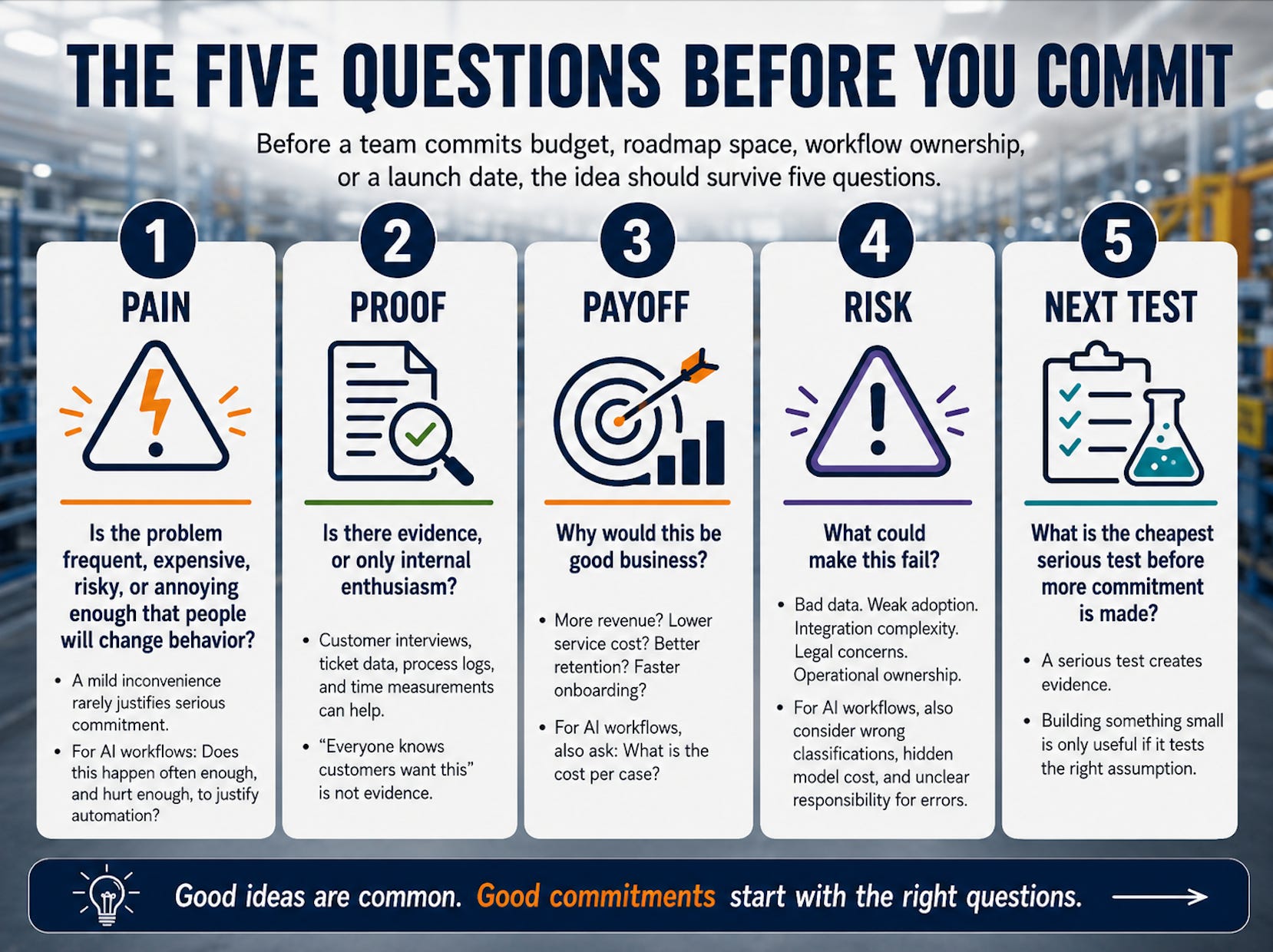
Pain. Proof. Payoff. Risk. Next Test.
Think of these five words as the management lens. The ten canvas fields below are simply a practical way to work through them.
The Five Questions Before You Commit
Before a team commits budget, roadmap space, workflow ownership or a launch date, the idea should survive five questions.
1. Pain
Is the problem frequent, expensive, risky or annoying enough that people will change behavior?
A mild inconvenience rarely justifies serious commitment.
For AI workflows, this question becomes even sharper:
Does this happen often enough and hurt enough, to justify automation?
An annoying task that happens twice a month may not need an AI agent. It may need a better checklist.
2. Proof
Is there evidence or only internal enthusiasm?
Sales feedback can be useful. Service complaints can be useful. Ticket data, order data, customer interviews, process logs, support logs and time measurements can be useful.
But “everyone knows customers want this” is not evidence.
And neither is:
“This looks like a perfect AI use case.”
That is a hypothesis. It still needs evidence.
3. Payoff
Why would this be good business?
More revenue? Lower service cost? Better customer retention? Faster onboarding? Fewer wrong orders? Less dependency on senior experts?
For AI workflows, also ask:
What is the cost per case?
Not only the cost to build. The cost to run.
A rough but honest commitment logic is better than a precise spreadsheet built on fantasy assumptions.
4. Risk
What could make this fail?
Bad data. Weak adoption. Dealer conflict. Unsafe recommendations. Integration complexity. Legal concerns. Operational ownership. Unclear pricing.
For AI workflows, add bad classifications, wrong tool calls, hidden model cost, prompt drift, missing audit trails, human review taking too long, automation of a broken process, data access issues and unclear responsibility for errors.
If the risk conversation feels uncomfortable, the canvas is probably doing useful work.
5. Next Test
What is the cheapest serious test before more commitment is made?
A serious test creates evidence. It does not have to be expensive, but it must be real enough to change the decision.
Building something small is only useful if it tests the right assumption.
A Special Case: AI Workflows and Automation
The same canvas also works for automation ideas and AI-based workflows.
That matters because many AI ideas do not fail during the demo.
They fail when real usage starts.
A workflow assistant, AI agent or internal copilot can create value. But it can also create ongoing cost every time it runs: model usage, tool calls, data retrieval, monitoring, human review, infrastructure and maintenance.
Every request has a meter running.
That does not make AI automation a bad idea. It just means the math and the risk have to be visible.
For an AI workflow, the canvas should ask:
How often does this workflow happen?
How much time or money does each case consume today?
What error, delay or frustration are we reducing?
What data is the agent allowed to see?
How many cases can be handled safely without human review?
When is human approval still required?
What does each run roughly cost?
What happens when the agent is uncertain?
Who monitors quality, cost and exceptions after launch?
A simple automation example:
Use an AI agent to pre-process incoming service emails, identify the machine, suggest the issue category, retrieve relevant documentation and prepare a draft response for a human service agent.
That may be worth testing if it reduces manual triage time without creating unsafe or wrong answers.
But the first useful version should probably not auto-answer customers. It might only classify requests, retrieve source documents and draft a response for review.
For AI workflows, the canvas protects against a common trap:
Automating a workflow before understanding whether the workflow is stable, frequent, valuable and safe enough to automate.
The First Commitment Canvas
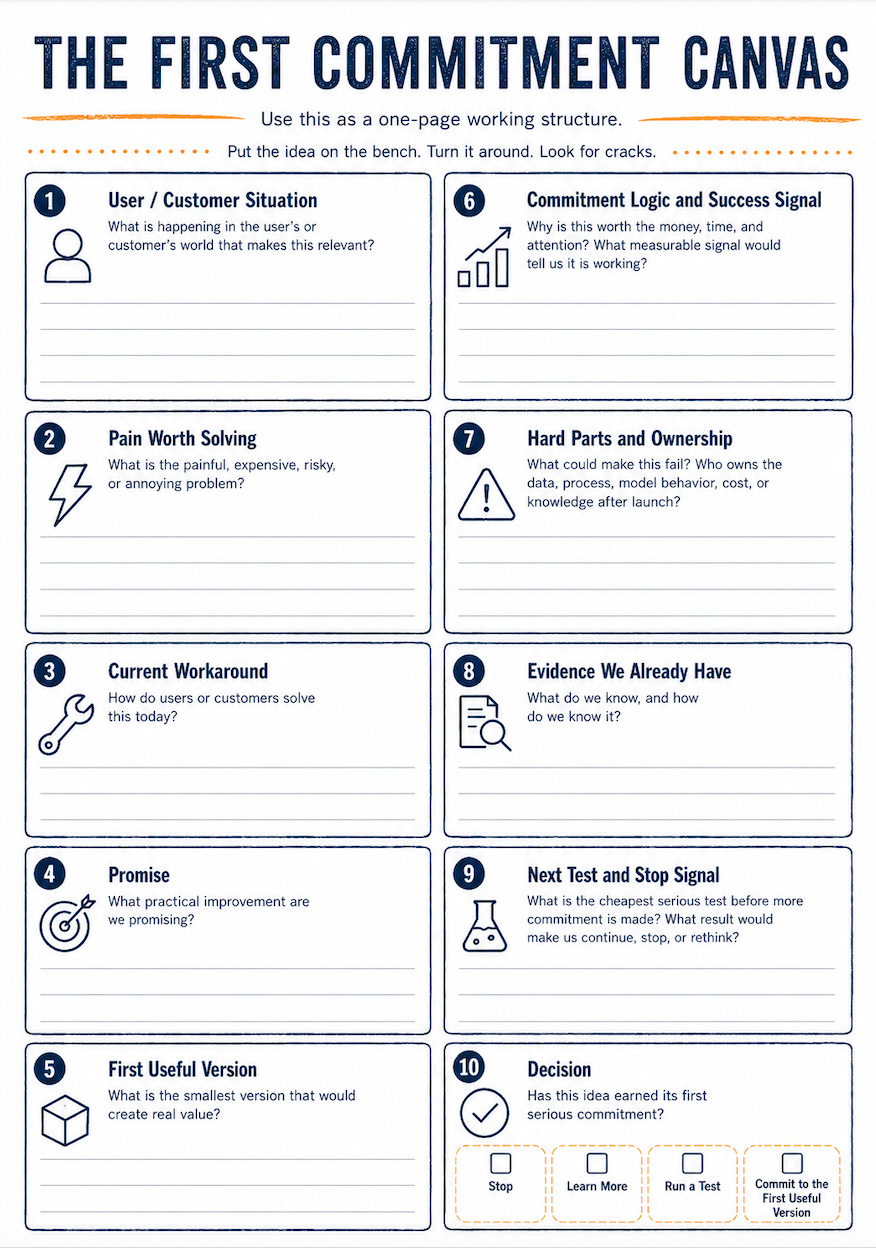
Use this as a one-page working structure.
Do not treat it like a form to complete politely. Treat it like a workbench.
Put the idea on the bench. Turn it around. Look for cracks.
The canvas has ten fields.
1. User / Customer Situation
Question: What is happening in the user’s or customer’s world that makes this relevant?
Start with the situation, not the solution.
Weak version:
“Customers need a better digital experience.”
Better version:
“Maintenance teams lose time because they cannot reliably identify the correct spare part for a specific machine.”
Another example:
“Junior field technicians need too much time to diagnose recurring machine faults, because practical troubleshooting knowledge is spread across manuals, service tickets and senior experts.”
For an AI workflow:
“Service agents spend too much time reading incoming emails, identifying the machine, finding the right documentation and deciding who should handle the case.”
The first sentence sounds nice. The second one can be tested.
2. Pain Worth Solving
Question: What is the painful, expensive, risky or annoying problem?
A good canvas separates real pain from corporate wishful thinking.
Look for pain with weight: lost production time, wrong spare parts orders, repeated service calls, slow response times, overloaded experts, high support effort, long technician onboarding, customer frustration, missed aftermarket revenue, compliance or safety risk, repeated copy-paste work or expensive expert time spent on low-value decisions.
For a spare parts portal, the pain may be:
Customers cannot confidently find the correct part for their exact machine configuration. That creates delays, wrong orders and avoidable service workload.
For an AI service assistant, the pain may be:
Less experienced technicians repeatedly escalate known fault cases to senior experts, slowing down service and creating bottlenecks.
For AI workflow automation, the pain may be:
Service emails arrive incomplete and unstructured, so experienced people spend too much time sorting cases before the actual service work begins.
Now the team has something concrete enough to test.
3. Current Workaround
Question: How do users or customers solve this today?
This is one of the most important fields.
A problem without a workaround is often not a serious problem.
People usually find a way. Maybe it is ugly. Maybe it is slow. Maybe it involves Excel, WhatsApp, screenshots, old binders, PDF manuals, inbox rules, copy-paste or calling the same expert every time.
That workaround is gold because it shows where the pain is real.
A spare parts example:
A customer takes a photo of the machine plate, sends it to service, waits for confirmation, receives a PDF drawing, circles the suspected part and asks again whether it fits.
A service technician example:
A junior technician searches the manual, calls a senior colleague, checks old service reports and writes the final answer into a personal notebook because the official system is too hard to search.
An AI workflow example:
A service agent reads the email, checks whether the serial number is present, searches the CRM, opens the documentation system, copies information into the ticket, assigns a category and forwards the case manually.
The workaround exists because your product does not.
4. Promise
Question: What practical improvement are we promising?
This is the plain-English promise of the idea.
For a spare parts portal:
A customer can identify the correct spare part for a specific machine without manual back-and-forth.
For an AI service assistant:
A technician can find likely causes, approved instructions and next steps faster while standing in front of the machine.
For an AI workflow:
A service agent receives a pre-classified ticket with missing information highlighted, relevant documents attached and a draft response ready for review.
The best promises are almost boring. That is why they work.
5. First Useful Version
Question: What is the smallest version that would create real value?
This is where teams often fool themselves.
They say “minimum,” but they mean “unfinished.”
They say “pilot,” but they mean “demo.”
They say “phase one,” but they quietly include the whole dream.
The first useful version must be small enough to build, but complete enough to matter.
For the spare parts portal, the first useful version might be:
one machine family
serial-number-based lookup
limited spare parts scope
clean images for selected assemblies
request-to-quote instead of full checkout
manual review for uncertain cases
Request-to-quote is often a better first step than full online checkout. Industrial pricing, discounts, availability, export rules, dealer responsibilities and customer-specific agreements are rarely simple enough for full automation on day one.
In many cases, the real pain is not payment. The real pain is finding the right part.
For the AI service assistant, the first useful version might be:
one machine type
five to ten recurring, low-risk fault cases
approved service documents only
links back to source material
clear confidence warnings
human escalation path
This should be a guided troubleshooting assistant, not an autonomous decision-maker.
Especially in safety-relevant service situations, the assistant should support technician judgment, not replace it.
For an AI workflow, the first useful version might be:
one inbox
one product line
selected request types
draft-only mode
no automatic customer replies
human review before sending
cost and quality tracking from day one
The first version should often assist the workflow before it automates the workflow.
That is less exciting than a fully autonomous agent.
It is also much safer.
6. Commitment Logic and Success Signal
Questions:
Why would this be worth the money, time and attention?
What measurable signal would tell us this is working?
This field is uncomfortable, but necessary.
Teams often talk about user value. The business value also needs to be visible. Both have to be true.
A spare parts portal could be worth exploring because it may reduce manual identification work in service, increase spare parts revenue, reduce wrong orders, improve customer retention, support dealers with better information or shift simple requests away from expensive expert time.
An AI service assistant could be worth exploring because it may reduce repeated escalations, shorten troubleshooting time, improve first-time fix rates, speed up onboarding or capture service knowledge before experienced technicians retire.
An AI workflow could be worth exploring because it may reduce manual triage time, shorten response time, reduce routing errors, prepare better tickets, reduce repetitive copy-paste work or let experienced people focus on harder cases.
At this stage, the exact return is probably unknown. That is fine.
But the logic should be clear enough to write a sentence like this:
“This is worth testing if it can reduce manual spare parts identification requests for machine family X by 20%.”
Or:
“This is worth testing if junior technicians can resolve common fault cases without escalating every time.”
Or:
“This is worth testing if the agent reduces manual triage time for selected service emails by 30% without increasing wrong classifications.”
For AI workflows, do not only estimate project cost. Estimate cost per case: model calls, tool usage, retrieval of documents or data, infrastructure, human review, monitoring, rework and the cost of mistakes.
A good success signal is concrete enough to measure later.
Examples include fewer manual spare parts identification requests, fewer wrong spare parts orders, shorter troubleshooting time, fewer repeated escalations, higher self-service usage, faster onboarding of new technicians, better first-time fix rate, lower triage time per service request, lower cost per processed case, fewer routing errors or stable quality under real workload.
The exact threshold depends on your business, your risk and your tolerance for being wrong.
The number does not need to be perfect. The logic needs to be honest.
7. Hard Parts and Ownership
Questions:
What could make this fail?
Who owns the data, process, model behavior, cost or knowledge after launch?
This is where the meeting becomes useful.
A weak canvas hides risk. A strong canvas brings risk into daylight.
For a spare parts portal, hard parts may include incomplete spare parts data, old part numbers and replacements, missing product images, machine-specific configurations, ERP integration, pricing rules, dealer agreements, customer permissions and liability when the wrong part is ordered.
A portal does not fix messy master data. It exposes it.
Many portal projects fail because the company wanted a front end and discovered a data problem.
Dealer agreements can also become a serious issue. If dealers currently own parts sales in certain regions, a direct customer portal may look like a support improvement internally and like channel conflict externally.
Ownership matters after launch.
If nobody owns parts data quality, the portal will slowly become a nice interface on top of decaying information.
For an AI service assistant, hard parts may include outdated service documentation, missing fault histories, unsafe or overconfident answers, poor connectivity on customer sites, multilingual service reality, technician trust, access rights, cybersecurity, feedback loops and responsibility when guidance is wrong.
AI may make messy service knowledge easier to search. It does not automatically make it reliable.
If nobody owns the knowledge base, the assistant will age the same way old manuals age: quietly and dangerously.
For AI workflows, hard parts may include messy input data, unstable process rules, missing serial numbers, unstructured attachments, ambiguous customer language, wrong classifications, tool-call failures, hidden cost growth, model changes, prompt maintenance, lack of audit trail, unclear human approval points, exception handling, cybersecurity and responsibility when the workflow makes a bad recommendation.
AI workflow ownership needs to be explicit.
Who monitors quality?
Who watches cost per case?
Who updates prompts and rules?
Who reviews failed cases?
Who decides whether the workflow is allowed to take the next step automatically?
That does not mean the idea should be avoided. It means the responsibility needs to be visible.
8. Evidence We Already Have
Question: What do we know and how do we know it?
This field separates evidence from folklore.
Weak evidence:
“Sales says customers want a portal.”
Better evidence:
“Seven of our top twenty customers asked for self-service spare parts identification in the last twelve months.”
Even better:
“In the last quarter, 38% of spare parts inquiries for machine family X required manual identification support.”
For the AI assistant:
Weak evidence:
“Technicians would love AI.”
Better evidence:
“New technicians ask senior experts the same troubleshooting questions during their first six months.”
Even better:
“We reviewed 200 service tickets and found that 35% match recurring fault patterns already documented in approved service material.”
For AI workflow automation:
Weak evidence:
“This inbox feels like a mess.”
Better evidence:
“Service agents spend two to three hours per day manually classifying incoming requests.”
Even better:
“We reviewed 100 recent service emails and found that 60% fall into five recurring categories, with an average triage time of six minutes per email.”
Perfect data is not required. But the team should know whether it is looking at evidence or enthusiasm.
Those are not the same thing.
9. Next Test and Stop Signal
Questions:
What is the cheapest serious test before more commitment is made?
What result would make us continue, stop or rethink?
This field turns the canvas into action.
Not every idea needs development next.
Sometimes the next step is a customer interview, a service-ticket analysis, a spare parts data audit, a clickable prototype, a manual concierge test, a technical spike, a cybersecurity review, a pricing conversation or a pilot with three customers.
For an AI workflow, one of the best first tests is often offline:
Run the workflow on historical cases without touching the live process.
That avoids customer risk while creating useful evidence.
For the spare parts portal, a good next test could be:
Take 50 recent spare parts requests for one machine family and check whether customers could have identified the correct part using the data currently available.
A possible success signal:
At least 70% of those requests can be resolved with available machine and parts data.
A possible stop or rethink signal:
The data is too incomplete, outdated or inconsistent for reliable self-service identification.
For the AI service assistant, a good next test could be:
Take five to ten recurring fault cases and check whether approved documentation is complete enough for an assistant to produce useful, safe guidance with source references.
A possible success signal:
The assistant can produce source-backed guidance for at least five low-risk recurring cases and service experts judge the answers as useful and safe.
A possible stop or rethink signal:
The knowledge is too incomplete, contradictory or unsafe to support technicians without heavy manual review.
For an AI workflow, a good next test could be:
Run the agent offline on 50 historical service emails and compare its classification, missing-information detection, document retrieval, draft response quality, review time and estimated cost per case.
A possible success signal:
The workflow reduces manual triage time by 30% for selected request types, while keeping wrong classifications below an agreed threshold.
A possible stop or rethink signal:
Human review takes as long as doing the work manually, classifications are unreliable or cost per processed case is too high.
These numbers are examples, not benchmarks. The exact threshold depends on the business.
The goal is not to prove the idea right. The goal is to learn where it breaks before the budget gets serious.
A good test needs a success signal and a stop signal. Otherwise, every test quietly turns into the next phase.
10. Decision
Question: Has this idea earned its first serious commitment?
This is where many product meetings fail.
They end with “great discussion” and no decision.
Use one of four decisions.
Stop
The pain is weak, the evidence is thin, the business logic is unclear, the cost per case is too high or the timing is wrong.
Stopping early is not failure. It is exactly what a good first decision gate is supposed to allow.
Learn More
The idea is interesting, but key assumptions are still foggy.
Define exactly what must be learned next.
Run a Test
There is enough signal to justify a focused experiment.
Set an owner, a date, success criteria, cost tracking and a stop signal.
Commit to the First Useful Version
The customer pain, evidence, business logic, delivery risk, running cost and ownership model are clear enough to build a first useful version.
Not the dream version. The first useful version.
A Simple Shortcut: 3-2-1
If the room gets stuck, use this shortcut before committing:
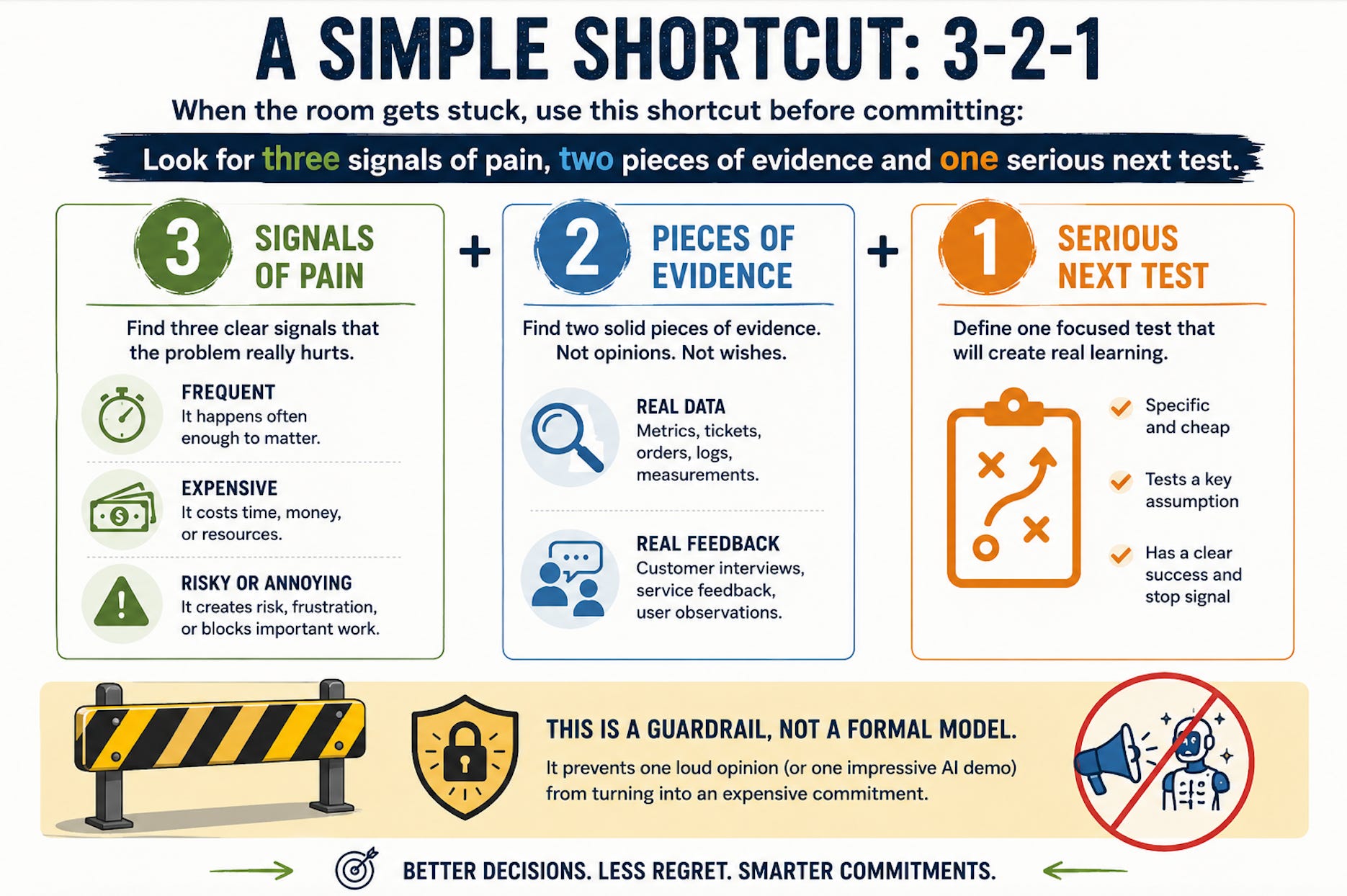
Look for three signals of pain, two pieces of evidence and one serious next test.
That is not science. It is a guardrail.
It prevents one loud opinion (or one impressive AI demo) from turning into an expensive commitment.
Example 1: Digital Spare Parts Portal
A machine manufacturer wants to build a digital spare parts portal.
The initial idea sounds straightforward:
“Customers should be able to order spare parts online.”
Reasonable enough.
But the canvas discussion reveals something important.
Customers are not mainly struggling with checkout. They are struggling with identification.
They do not always know which part fits their exact machine configuration. The same machine type may have changed over the years. Some machines were customized. Some parts were replaced by newer versions. Documentation exists, but it is spread across PDFs, ERP fields, service knowledge and old drawings.
So the promise changes from:
“An online shop for spare parts.”
to:
“A customer can confidently identify the correct spare part for their specific machine.”
That is a much better direction.
It also changes the first useful version.
The team may decide not to start with full e-commerce, payment, discount logic and global rollout. Instead, they start with one machine family, serial-number lookup, selected assemblies, clean part images and request-to-quote.
It is less glamorous than a full e-commerce rollout, but much closer to the real problem.
The canvas helps avoid building a beautiful checkout flow for customers who still cannot find the right part.
Mini-Canvas: Spare Parts Portal
User / Customer Situation
Maintenance teams need replacement parts quickly, often under production pressure.
Pain Worth Solving
They cannot reliably identify the correct part from PDFs, machine labels or old documentation.
Current Workaround
They call service, send photos, wait for confirmation and often involve multiple people.
Promise
Find the correct spare part for a specific machine without manual back-and-forth.
First Useful Version
One machine family, serial-number lookup, selected assemblies, request-to-quote.
Commitment Logic and Success Signal
Reduce manual service workload, reduce wrong orders and improve spare parts conversion. A useful early signal would be a measurable drop in manual identification requests for the selected machine family.
Hard Parts and Ownership
Parts data quality, machine configuration history, replaced part numbers, dealer rules and clear ownership for keeping parts data current.
Evidence
Recent spare parts inquiries show repeated manual identification work.
Next Test and Stop Signal
Review 50 recent requests and check whether current data would support self-service identification. Rethink the idea if the data is too incomplete for reliable identification.
Decision
Run a data and workflow test before building the portal.
Example 2: AI Assistant for Service Technicians
Now take the AI assistant.
The first idea might sound like this:
“We want an AI assistant that helps technicians solve machine problems.”
That sentence is too broad to commit to.
The canvas forces the team to narrow the situation.
Who exactly is the user?
A junior field technician?
A senior service expert?
A hotline employee?
A customer’s maintenance team?
The answer changes the product.
Let’s say the focus is junior field technicians working on one machine family.
The pain:
They lose time searching through manuals and asking senior colleagues about recurring fault cases.
The current workaround:
They call the same experts, search PDFs, check old service reports and keep private notes.
The first useful version:
A guided troubleshooting assistant that covers five to ten recurring, low-risk fault cases for one machine type, uses approved service documents only, shows source references and offers escalation when confidence is low.
The hard parts are documentation quality, safety, wrong answers, trust, access rights, connectivity and responsibility.
There is also a feedback problem. Every answer should create feedback: helpful, wrong, incomplete or unsafe. Unanswered and uncertain questions should also be logged, because they show where documentation or training needs improvement.
The next test is not a big AI project.
It is a knowledge-quality check:
Do we actually have approved, complete and usable troubleshooting knowledge for these cases?
That is a mature product move.
Instead of “let’s add AI,” the better question is:
“Is our service knowledge ready to support technicians in a controlled way?”
The canvas turns a fashionable idea into a practical decision.
Mini-Canvas: AI Assistant for Service Technicians
User / Customer Situation
Junior technicians work under time pressure and need help diagnosing recurring machine faults.
Pain Worth Solving
They spend too much time searching manuals or escalating known issues to senior experts.
Current Workaround
They call experienced colleagues, search PDFs, check old tickets and keep personal notes.
Promise
Find likely causes, approved instructions and next steps faster, with source references.
First Useful Version
One machine type, five to ten low-risk recurring fault cases, approved documentation only, escalation path and feedback on every answer.
Commitment Logic and Success Signal
Reduce repeated escalations, shorten troubleshooting time and support technician onboarding. A useful early signal would be fewer escalations for the selected recurring fault cases.
Hard Parts and Ownership
Documentation quality, unsafe answers, trust, access rights, offline situations, responsibility and ownership of the knowledge base after launch.
Evidence
Ticket review shows recurring fault patterns and repeated questions from newer technicians.
Next Test and Stop Signal
Check whether approved documentation is complete enough for five to ten recurring cases. Rethink the idea if the knowledge is inconsistent, incomplete or unsafe.
Decision
Run a knowledge-quality test before building an assistant.
Example 3: AI Workflow for Service Email Triage
Now take a more operational AI workflow.
A service team receives hundreds of incoming emails every month.
Some include machine serial numbers. Some include photos. Some include vague descriptions. Some are urgent. Some should go to spare parts. Some should go to field service. Some should go to warranty.
The idea sounds simple:
“Let’s use an AI agent to pre-process incoming service emails.”
That may be a very good idea.
But it is not automatically a good commitment.
The canvas forces a better question:
“Which part of this workflow is stable, frequent, valuable and safe enough to automate?”
The first useful version should probably not send automatic replies to customers.
A safer version might classify the request type, detect missing information, identify the machine if possible, retrieve relevant documents, prepare a draft response, flag uncertainty and send everything to a human for review.
That is still useful. It reduces triage work without pretending the agent is ready to own the customer interaction.
The team should also calculate cost per case.
If each email triggers several model calls, retrieval steps, tool calls and human review, the running cost may be fine or it may quietly eat the expected savings.
That is why AI workflows need the same first decision gate as product ideas.
Maybe even more.
Mini-Canvas: AI Workflow for Service Email Triage
User / Customer Situation
Service teams receive many incoming emails with incomplete machine information, vague problem descriptions and attached photos or PDFs.
Pain Worth Solving
Manual triage takes time, delays response and often requires experienced people just to classify the request.
Current Workaround
Service staff read the email, search for machine data, identify the issue category, look up documentation and forward the case manually.
Promise
Pre-classify service emails, identify missing information, retrieve relevant documents and prepare a draft response for human review.
First Useful Version
One product line, selected request types, internal use only, draft responses only, no automatic customer replies.
Commitment Logic and Success Signal
Reduce triage time for selected request types. A useful early signal would be 30% less manual triage time without increasing wrong classifications or review effort.
Hard Parts and Ownership
Messy email content, missing serial numbers, attachments, multilingual requests, wrong classifications, data access, model cost per case and ownership for prompts, rules, quality monitoring and exception handling.
Evidence
Review 100 recent service emails and measure triage time, recurring categories, missing information, escalation patterns and estimated cost per case.
Next Test and Stop Signal
Run the workflow offline on 50 historical cases. Rethink if classifications are unreliable, human review takes too long or model/tool cost per case is too high.
Decision
Run an offline workflow test before connecting the agent to live service processes.
A 60-Minute Format for Your Next Product Meeting
This does not require a two-day workshop.
A rough first pass in 60 minutes is often enough to decide whether to stop, test or dig deeper.
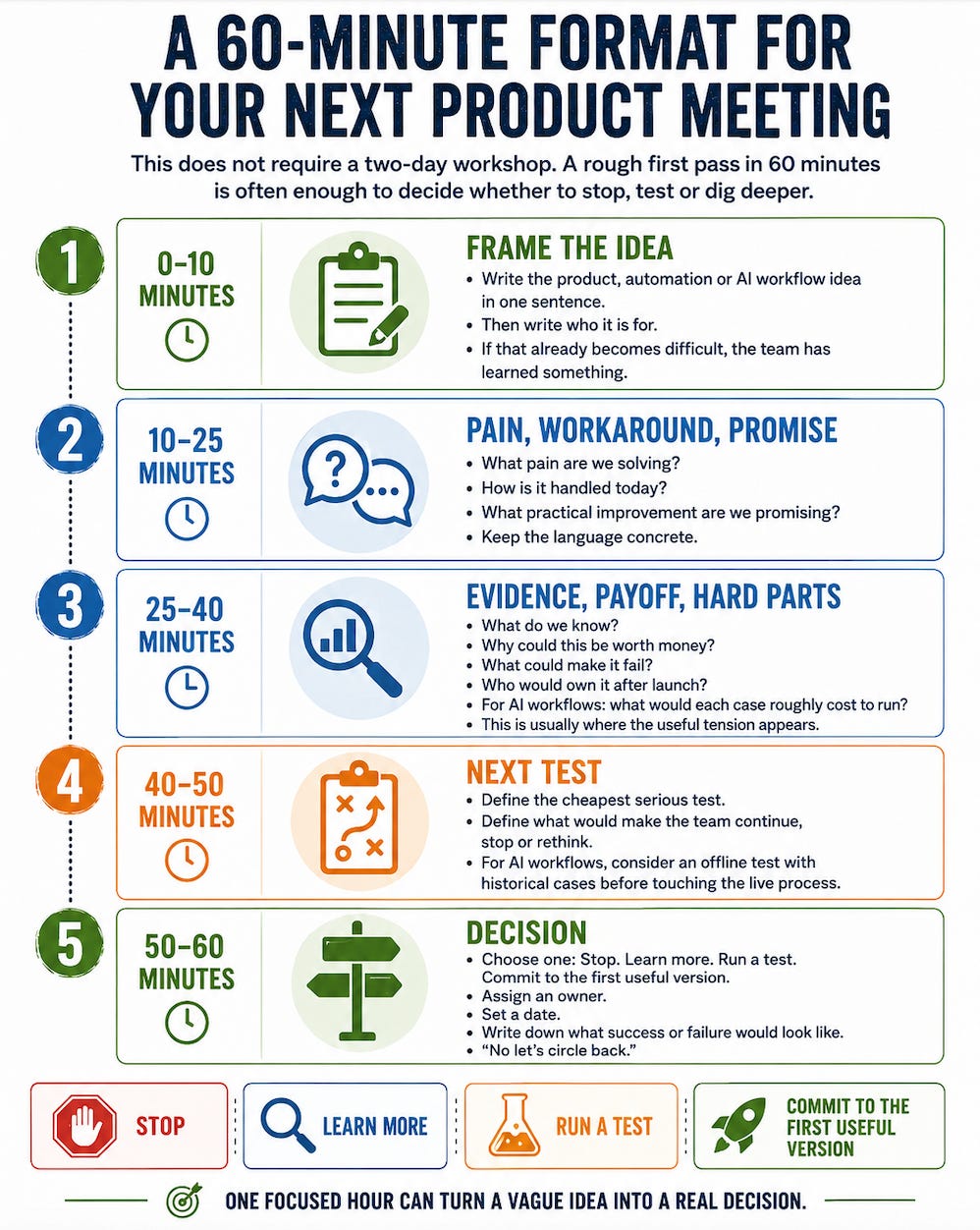
0–10 minutes: Frame the idea
Write the product, automation or AI workflow idea in one sentence.
Then write who it is for.
If that already becomes difficult, the team has learned something.
10–25 minutes: Pain, workaround, promise
Discuss:
What pain are we solving?
How is it handled today?
What practical improvement are we promising?
Keep the language concrete.
25–40 minutes: Evidence, payoff, hard parts
Discuss:
What do we know?
Why could this be worth money?
What could make it fail?
Who would own it after launch?
For AI workflows: what would each case roughly cost to run?
This is usually where the useful tension appears.
40–50 minutes: Next test
Define the cheapest serious test.
Also define what would make the team continue, stop or rethink.
For AI workflows, consider an offline test with historical cases before touching the live process.
50–60 minutes: Decision
Choose one:
Stop.
Learn more.
Run a test.
Commit to the first useful version.
Assign an owner.
Set a date.
Write down what success or failure would look like.
No “let’s circle back.”
Where This Fits: Agile, Lean and Traditional Projects
The First Commitment Canvas sits before commitment.
If a team already uses a decision loop, prioritisation method, portfolio review or roadmap planning process, the First Commitment Canvas should sit before it. It helps decide whether a raw idea is mature enough to enter that process in the first place.
In Lean-Agile work, it belongs before the backlog gets serious. It helps clarify which assumptions should be tested, what evidence is missing and what the next learning step should be.
It should not become a heavy approval gate. It should make learning faster and sharper.
Building something small is only useful if it tests the right assumption. The canvas helps find that assumption before a team starts building.
In more traditional project environments, the canvas works well before the business case or project charter. It helps answer a simple question:
Do we know enough to turn this idea into a project or should we test something first?
The canvas is not the business case.
It is the conversation that makes the business case less fictional.
Used this way, the canvas does not fight the method. It improves the decision before the method takes over.
How This Relates to Decision Loops, Prioritisation and Roadmaps
The First Commitment Canvas is not meant to replace your decision loop, prioritisation framework, portfolio review, roadmap process or delivery method.
It sits one step earlier.
It helps decide whether a raw idea has earned its first serious commitment. That is useful before an idea becomes a serious backlog item, project candidate, AI workflow initiative or capacity discussion.
Once the idea has enough shape, the next process can take over.
That might be a product prioritisation model, a portfolio review, a roadmap discussion, an agile discovery loop, a Double Diamond process, the Resonance Action Loop or a traditional project approval process.
The exact method matters less than the sequence.
Put simply:
The First Commitment Canvas asks: “Has this idea earned its first serious commitment?”
The next decision loop asks: “What action should we take now and how will we know whether it worked?”
Use the canvas when the idea is still foggy.
Use your prioritisation or decision loop when the decision is real.
Or shorter:
Canvas before first commitment.
Loop before action.
The canvas prevents immature ideas from becoming expensive commitments too early.
A good decision loop prevents mature items from becoming vague priorities without action or follow-up.
Together, they help teams move from idea to decision to action to observed effect.
How This Relates to the Double Diamond
The First Commitment Canvas also fits well with the Double Diamond.
The Double Diamond helps teams move from problem understanding to solution delivery: Discover, Define, Develop and Deliver.
The First Commitment Canvas usually sits one step earlier.
It helps decide whether a raw idea is mature enough to deserve structured discovery, budget, capacity or a first serious test in the first place.
Put simply:
The First Commitment Canvas asks: “Has this idea earned its first serious commitment?”
The Double Diamond asks: “How do we understand the problem, define it clearly, explore solutions and deliver something that works?”
You can also use the canvas inside the Double Diamond.
During Discover, it helps focus research on pain, evidence, current workarounds, risk and business logic.
At the end of Define, it can act as a commitment check before the team moves into Develop.
The canvas does not replace the Double Diamond.
It makes sure the team does not enter a full discovery or solution process just because an idea sounded good in a meeting.
Think of it this way:
The First Commitment Canvas helps decide whether the machine is worth walking over to.
The Double Diamond helps you inspect it properly before moving it.
When a Canvas Is Not Enough
A canvas is useful early.
But it does not replace deeper work: customer research, financial planning, architecture, cybersecurity, legal review, data governance, safety assessment, delivery planning, go-to-market work and real user testing.
For AI workflows, it also does not replace security review, privacy assessment, model evaluation, cost monitoring, auditability, human approval design or operational runbooks.
This is especially important in industrial environments.
If the product or workflow affects machine safety, production uptime, spare parts availability, contractual service levels, customer communication, regulated processes or legally sensitive decisions, the canvas is only the starting point.
Think of it like walking the shopfloor before changing a production line.
You would first watch the work, ask the operators, check constraints and understand what breaks when the flow changes.
Product work deserves the same discipline.
Automation does too.
The Biggest Misunderstanding
The biggest misunderstanding is this:
“The canvas gives us clarity.”
Not quite.
The canvas does not create clarity by itself. The conversation creates clarity.
The canvas is just the table.
The real work is what people are willing to say around it.
Bad canvas language sounds like this:
“Improve customer experience.”
“Increase efficiency.”
“Use AI to support service.”
“Automate internal workflows.”
“Create a modern digital platform.”
Good canvas language sounds like this:
“Reduce manual spare parts identification requests for machine family X.”
“Help junior technicians resolve recurring low-risk fault cases without escalating every time.”
“Test whether customers can identify the correct spare part using serial-number lookup.”
“Check whether approved service documentation is complete enough for assisted troubleshooting.”
“Reduce manual triage time for selected service emails without increasing wrong classifications or review effort.”
Specificity is the difference between product work and theater.
Common Mistakes
Mistake 1: Starting with features
A feature list feels productive, but features are answers. You need to understand the question first.
A roadmap full of features is not a strategy. It is often just a list of promises nobody has tested yet.
Mistake 2: Confusing internal excitement with demand
The team may love the idea.
That does not mean customers will use it, pay for it or change their behavior.
For AI workflows, internal excitement is even easier to create. A demo can look impressive while still failing on real exceptions, running cost or review effort.
Mistake 3: Ignoring operational reality
A customer portal needs more than a nice interface. It needs usable product structures, correct part numbers, clean images, pricing rules, permissions, support processes and someone who owns the data after launch.
An AI assistant needs more than a model. It needs approved knowledge, clear boundaries, feedback loops and people who trust it enough to use it, but not so blindly that they stop thinking.
An AI workflow needs more than a clever prompt. It needs stable inputs, clear rules, safe handoffs, cost monitoring, fallback behavior and ownership after launch.
Mistake 4: Treating the canvas as alignment theater
A canvas filled with vague, agreeable statements is worse than useless.
It creates false confidence.
The room should feel a little uncomfortable. That is usually where the useful part starts.
The First Commitment Canvas
Copy this into a document, whiteboard or workshop board.
1. User / Customer Situation
What is happening in the user’s or customer’s world that makes this relevant?
2. Pain Worth Solving
What problem is painful, expensive, risky or annoying enough to matter?
3. Current Workaround
How do users or customers solve this today?
4. Promise
What practical improvement are we promising?
5. First Useful Version
What is the smallest version that would create real value?
6. Commitment Logic and Success Signal
Why could this be worth the money, time and attention? What measurable signal would tell us this is working?
For AI workflows: what is the expected cost per case?
7. Hard Parts and Ownership
What could make this fail? Who owns the data, process, model behavior, cost or knowledge after launch?
8. Existing Evidence
What do we know and how do we know it?
9. Next Test and Stop Signal
What is the cheapest serious test before more commitment is made? What result would make us continue, stop or rethink?
10. Decision
Has this idea earned its first serious commitment?
Final Thoughts
The First Commitment Canvas is a lightweight first decision gate.
It protects teams from spending serious time and money before the idea has earned that commitment.
Sometimes it leads to a first useful version. Sometimes it leads to a small test. Sometimes it shows that the smartest move is to stop.
All three outcomes are valuable.
That is especially true for AI workflows.
A demo can be cheap. Daily usage may not be.
A workflow can look simple. The exceptions may not be.
An agent can answer quickly. That does not mean it answers safely.
Good product work often starts before anything is built: before the roadmap, before the vendor selection, before the architecture diagram, before an AI agent touches a live workflow, before someone announces a launch date at the sales meeting.
It starts with a sharper conversation.
So take one idea from the backlog.
A customer portal.
An AI assistant.
A workflow automation.
A connected machine feature.
A hardware-adjacent digital service.
Put it through the First Commitment Canvas.
Do not aim for a perfect document.
Aim for a better decision.
Suggested Call-to-Action
Before the next product meeting, pick one idea that has been floating around for a while.
A customer portal.
An AI assistant.
A new service app.
A connected machine feature.
A hardware-adjacent digital service.
An AI workflow that “should be easy to automate.”
Put it through the First Commitment Canvas.
Do not ask only:
“Can we build this?”
Ask:
“What would have to be true for this to be worth building?”
And for AI workflows, also ask:
“What would have to be true for this to be worth running every day?”
That one question changes the conversation.
